
Day 10: Loading Real Healthcare Data - PDFs, DICOM Reports, Word Docs, and Excel
RAG for Healthcare | Day 10 of 35 | Free

Yesterday you learned LangChain’s five components and saw that loading a PDF is one line of code: PyPDFLoader("file.pdf").load(). Clean, simple, beautiful.
Now here’s what actually happens when you try that on real healthcare data:
The PDF is a scanned clinical practice guideline from 2019 - it’s an image, not text. The loader returns empty strings. The Word document is a committee meeting minutes with tracked changes, headers, footers, and embedded tables. The loader mashes them into one unreadable blob. The Excel spreadsheet has merged cells across patient outcome columns, and the loader misaligns half the rows. The radiology reports are plain-text exports from the PACS, and every report has a different structure depending on which radiologist dictated it.
Data loading is where 80% of RAG projects stall. Not because loading is conceptually hard - it’s not - but because real clinical data is messy in ways that tutorials never show you. Today we fix that.
Why Loading Is the Hardest “Easy” Step
Every RAG tutorial starts with a clean PDF and a single line of code. But in a hospital, you are dealing with documents that have accumulated over decades, in formats chosen for human readability - not machine processing.
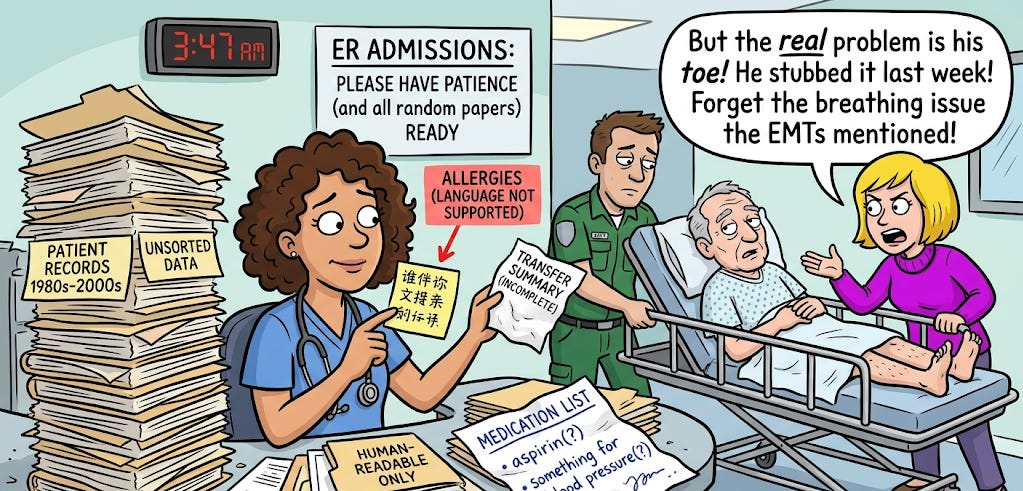
The analogy: Think of loading data like admitting patients to a hospital. In a textbook, admission is straightforward: patient arrives, you take a history, run labs, assign a bed. In reality, the patient arrives via ambulance with an incomplete transfer summary, allergies listed in a language your system doesn’t support, a medication list scrawled on a napkin, and a family member who insists the real problem is something completely different from what the EMTs reported.
Loading healthcare data is that admission process. The theory is simple. The reality requires experience, patience, and a toolkit for edge cases.
Format 1: PDFs: The Workhorse (and the Headache)
PDFs are the most common format in healthcare - clinical practice guidelines, journal articles, formulary documents, institutional policies, informed consent templates, IRB protocols. You will load more PDFs than any other format.
Clinical context: An IRB (Institutional Review Board) is the committee that reviews and approves research involving human subjects. IRB protocols are dense documents - often 30–80 pages - describing the study design, inclusion/exclusion criteria, procedures, and safety monitoring plan. They’re almost always PDFs, and they’re a common target for RAG systems because researchers need to quickly find specific protocol details.
The easy case: Digital (text-based) PDFs
These are PDFs created directly from Word, LaTeX, or a web browser. The text is embedded in the file as actual characters. This is the case the tutorials show you.
python
from langchain_community.document_loaders import PyPDFLoader

loader = PyPDFLoader("aha_heart_failure_guideline_2024.pdf")
documents = loader.load()
# Each page becomes a Document with page_content and metadata
PyPDFLoader returns one Document per page, with metadata including the page number and source filename. For most digital clinical guidelines - AHA/ACC, ESC, KDIGO, ADA - this works perfectly.
Clinical context: ESC (European Society of Cardiology), KDIGO (Kidney Disease: Improving Global Outcomes), and ADA (American Diabetes Association) are the major guideline-publishing bodies for their respective specialties. Their guidelines are the primary source documents for clinical RAG systems.
When to use it: Digital PDFs where text is selectable. If you can highlight and copy text from the PDF in a viewer, it’s a digital PDF.
The hard case: Scanned PDFs (OCR required)
Scanned PDFs are images of documents - a physical page was photographed or scanned, and the result is a PDF containing picture data, not text data. PyPDFLoader returns empty strings or garbage.
In healthcare, scanned PDFs are everywhere: older institutional policies that were printed and scanned, consent forms with handwritten signatures that were scanned for the chart, pathology reports from legacy systems, historical patient records.
The analogy: Loading a scanned PDF without OCR is like asking a librarian to read a book that’s locked inside a glass case. They can see it, but they can’t access the text. OCR (Optical Character Recognition) breaks the glass - it converts the image of text into actual text characters the computer can process.
Clinical context: OCR is the technology that converts images of text into machine-readable text. It’s the same technology that lets your phone scan a receipt or your EHR system digitize handwritten prescription forms. Tesseract is the most widely used open-source OCR engine, originally developed by HP Labs and later maintained by Google.
python
from langchain_community.document_loaders import UnstructuredPDFLoader

# mode="elements" parses the document into structural components
# (paragraphs, tables, headers) rather than one giant text blob
loader = UnstructuredPDFLoader(
    "scanned_pathology_report.pdf",
    mode="elements",
    strategy="ocr_only",  # Force OCR processing
)
documents = loader.load()
UnstructuredPDFLoader with strategy="ocr_only" runs Tesseract OCR on every page, converting images to text. It’s slower (seconds per page instead of milliseconds), but it handles scanned documents that PyPDFLoader can’t touch.
Installation note: OCR requires additional system libraries. In Google Colab:
python
!apt-get install -q tesseract-ocr
!pip install -q unstructured[pdf] pytesseract
The tricky case: Multi-column academic papers
Medical journal articles (NEJM, JAMA, Lancet, Circulation) use two-column layouts. Standard PDF loaders read left-to-right across the full page width, which means they read the first line of column 1, then jump to the first line of column 2, creating jumbled nonsense.
The analogy: Imagine reading a newspaper by going straight across both columns - “The president announced today a recipe for chocolate cake...” That’s what a naive PDF loader does with a two-column journal article.
The fix is to use a loader that understands document layout:
python
loader = UnstructuredPDFLoader(
    "nejm_clinical_trial_results.pdf",
    mode="elements",
    strategy="hi_res",  # Uses layout detection model
)
documents = loader.load()
strategy="hi_res" uses a document layout detection model to identify columns, tables, headers, and reading order before extracting text. It’s the slowest option but handles complex layouts correctly.
PDF loader decision tree

Pro tip for large PDFs: If you have a 500-page formulary PDF, don’t load the whole thing in one call - it’s slow and memory-heavy. Instead, load page ranges:
python
# Load pages 1-50, process them, then load the next batch
loader = PyPDFLoader("formulary_2024.pdf")
pages = loader.load()
# Then filter: [p for p in pages if p.metadata["page"] < 50]
Format 2: Word Documents - Committee Minutes and Protocols
Word documents are the second most common format in healthcare institutions. Committee meeting minutes, standard operating procedures, clinical protocols, policy documents, research protocols, grant applications.
Clinical context: In a typical hospital, the Pharmacy & Therapeutics (P&T) Committee meets monthly to review medication formulary decisions, drug safety alerts, and therapeutic interchange policies. Their meeting minutes - usually Word documents - contain the institutional reasoning behind drug approvals, restrictions, and formulary additions. These are goldmines for a RAG system because they capture the “why” behind medication policies that the formulary PDF doesn’t explain.
python
from langchain_community.document_loaders import UnstructuredWordDocumentLoader

loader = UnstructuredWordDocumentLoader(
    "pt_committee_minutes_march2024.docx",
    mode="elements",  # Preserves structure: headings, paragraphs, tables
)
documents = loader.load()
mode="elements" is critical here. Without it, the loader returns the entire document as one giant text blob - headers mixed with body text, table contents mixed with paragraphs. With mode="elements", each structural element (heading, paragraph, table, list item) becomes a separate Document with metadata about its element type.
Handling tracked changes and comments
Word documents from clinical committees often have tracked changes and reviewer comments - a cardiologist’s suggested revision, a pharmacist’s dosing correction, a legal review comment. By default, UnstructuredWordDocumentLoader loads only the accepted/current text, ignoring tracked changes and comments.
This is usually what you want for a RAG system - you want the final, approved version. But if your use case requires the revision history (for audit trail purposes), you’ll need to pre-process the document with python-docx to extract tracked changes separately.
Headers, footers, and page numbers
Word documents often have headers and footers with document titles, page numbers, confidentiality notices (”CONFIDENTIAL - Do Not Distribute”), and version numbers. These get loaded as part of the document content and will appear in your chunks.
The fix: Strip them during post-processing, before chunking:
python
# After loading, filter out repetitive header/footer content
cleaned_docs = []
for doc in documents:
    text = doc.page_content
    # Remove common header/footer patterns
    if text.strip() in ["CONFIDENTIAL", "Page"] or len(text.strip()) < 10:
        continue
    cleaned_docs.append(doc)
Format 3: Excel - Outcomes Data and Registries
Healthcare Excel files are a particular challenge because they’re often structured for human visual consumption, not machine processing - merged cells, color-coded rows, multi-row headers, mixed data types in the same column.
Clinical context: Hospital quality teams maintain Excel spreadsheets for everything from CLABSI rates to surgical site infection tracking to 30-day readmission metrics. CLABSI (Central Line-Associated Bloodstream Infection) is one of the key hospital-acquired infection measures tracked by CMS (Centers for Medicare & Medicaid Services) and tied to hospital reimbursement. These spreadsheets are regularly updated and contain both numerical data and narrative comments - making them useful but challenging for RAG.
python
from langchain_community.document_loaders import UnstructuredExcelLoader

loader = UnstructuredExcelLoader(
    "patient_outcomes_q1_2024.xlsx",
    mode="elements",
)
documents = loader.load()
The merged cell problem
Excel files from quality departments almost always have merged cells - a department name spanning columns A through D, a date range header merged across the top, category labels spanning multiple rows. Merged cells confuse document loaders because the cell content appears once, but the visual layout implies it applies to multiple rows or columns.
The fix: Pre-process with openpyxl or pandas to unmerge cells and fill values before loading:
python
import pandas as pd

# Read and clean the Excel file first
df = pd.read_excel("patient_outcomes_q1_2024.xlsx")
df.ffill(inplace=True)  # Forward-fill merged cell values
df.to_csv("cleaned_outcomes.csv", index=False)

# Then load the cleaned CSV
from langchain_community.document_loaders import CSVLoader
loader = CSVLoader("cleaned_outcomes.csv")
documents = loader.load()
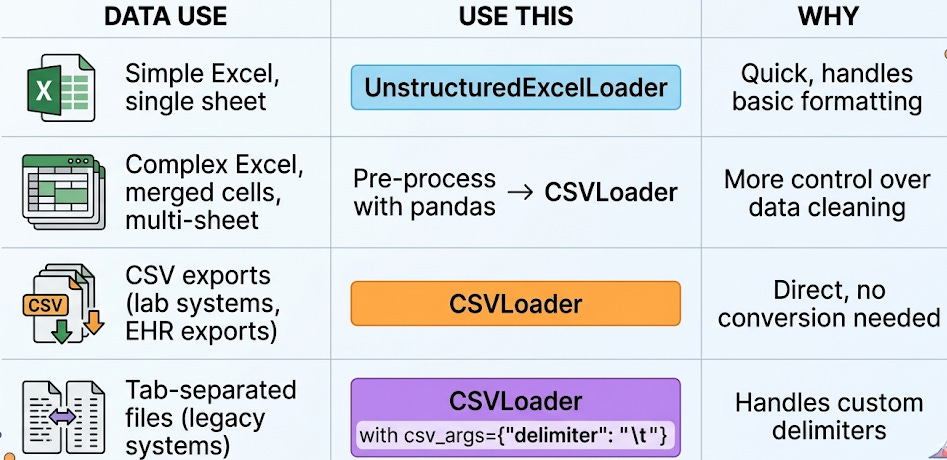
Pro tip: For heavily structured spreadsheets (pivot tables, multi-sheet workbooks, complex formulas), it’s often faster to export to CSV via pandas and load the CSV than to fight with the Excel loader’s interpretation of the layout.
When to use CSVLoader vs. UnstructuredExcelLoader
Format 4: Plain Text - Radiology Reports and EHR Exports
Plain text is the simplest format to load - and the most common output format from clinical systems. Radiology reports exported from PACS, discharge summaries exported from the EHR, pathology results, operative notes - many clinical systems export to .txt or pipe-delimited text files.
Clinical context: PACS (Picture Archiving and Communication System) is the system that stores and distributes medical images - X-rays, CTs, MRIs, ultrasounds. Radiologists dictate their reports within the PACS or a connected reporting system. When these reports are exported for research or quality improvement, they typically arrive as plain text files - one file per report, or one large file with reports separated by delimiters.
python
from langchain_community.document_loaders import TextLoader

loader = TextLoader("radiology_reports_batch.txt")
documents = loader.load()
The structure problem with radiology reports
Radiology reports follow a loose structure - typically INDICATION, TECHNIQUE, COMPARISON, FINDINGS, and IMPRESSION - but the exact headers, formatting, and level of detail vary by radiologist. One radiologist writes “FINDINGS:” and another writes “Findings:” and a third writes “REPORT:” and a fourth uses no headers at all.
This matters for chunking (Day 5). If you chunk blindly by character count, you might split a finding mid-sentence. If you try to chunk by section headers, the inconsistent formatting breaks your logic.
The fix: Normalize the structure before loading:
python
import re

def normalize_radiology_report(text: str) -> str:
    """Standardize common radiology report section headers."""
    # Normalize header variations to a consistent format
    text = re.sub(
        r'(?i)(findings|impression|technique|indication|comparison)\s*:?\s*',
        lambda m: f"\n\n{m.group(1).upper()}:\n",
        text
    )
    return text.strip()
This pre-processing step - normalizing headers before loading - saves enormous headaches downstream. Your chunker (Day 5) can now reliably split by section.
Format 5: DICOM Structured Reports
DICOM (Digital Imaging and Communications in Medicine) is the universal standard for medical images. Every CT, MRI, X-ray, ultrasound, and PET scan is stored in DICOM format. But DICOM files can also contain structured reports - machine-readable clinical data embedded alongside the images.
Clinical context: A DICOM Structured Report (DICOM SR) is a standardized way to encode clinical measurements and findings. For example, an echocardiography DICOM SR contains the measured ejection fraction, valve gradients, chamber dimensions, and wall motion assessments - not as free text, but as coded, structured data with standardized terminology (SNOMED CT codes). This is different from the radiologist’s narrative report, which is free text.
DICOM SRs aren’t directly loadable with LangChain’s built-in loaders. You need a pre-processing step using pydicom:
python
import pydicom

ds = pydicom.dcmread("echo_structured_report.dcm")

# Extract the text content from the structured report
# The structure varies by modality and manufacturer
sr_text = []
if hasattr(ds, 'ContentSequence'):
    for item in ds.ContentSequence:
        if hasattr(item, 'TextValue'):
            sr_text.append(item.TextValue)
        if hasattr(item, 'ConceptNameCodeSequence'):
            name = item.ConceptNameCodeSequence[0].CodeMeaning
            sr_text.append(f"{name}: {getattr(item, 'TextValue', 'N/A')}")

# Now create a LangChain Document manually
from langchain_core.documents import Document
doc = Document(
    page_content="\n".join(sr_text),
    metadata={"source": "echo_structured_report.dcm", "modality": "US"}
)
This is one of the formats where LangChain doesn’t have a built-in loader, so you write a custom loader and produce a standard Document object. The downstream pipeline (chunking, embedding, retrieval) doesn’t care how the document was created - it just works with the Document interface.
The Universal Loading Pattern
Regardless of format, every loading task follows the same four-step pattern:
Step 1: Identify the format and choose the loader. Use the decision tables above.
Step 2: Load with mode="elements" when available. This preserves document structure and gives you cleaner chunks downstream.
Step 3: Post-process and clean. Strip headers/footers, normalize section headings, fill merged cells, remove boilerplate. This step is where the real work happens - and where most tutorials stop too early.
Step 4: Verify. Print a few loaded documents and check: Does the text make sense? Are sections preserved? Is metadata (page number, source) attached? Are there any garbage characters or OCR artifacts?
python
# Always verify after loading
for doc in documents[:3]:
    print(f"Source: {doc.metadata}")
    print(f"Length: {len(doc.page_content)} chars")
    print(f"Preview: {doc.page_content[:200]}")
    print("---")
This verification step takes 30 seconds and saves hours of debugging downstream. If your loaded text is garbled, no amount of clever chunking, embedding, or prompting will fix it. Garbage in, garbage out - all the way through the pipeline.
Your Takeaway for Today
Data loading is where RAG projects succeed or fail. Real healthcare data is messy - scanned PDFs, merged Excel cells, inconsistent radiology report headers, DICOM structured reports. The loaders get you 80% of the way there. The last 20% is post-processing: cleaning, normalizing, and verifying before anything enters your pipeline. Always check your loaded output before moving to chunking.
Coming Tomorrow: Day 11
The OpenAI API for RAG - Connecting Your Retriever to GPT
You have loaded, chunked, embedded, and stored your clinical documents. Tomorrow you learn the generation side: how to call the OpenAI Chat Completions API with retrieved context, format multi-chunk clinical context for the LLM, manage token budgets, and set parameters (temperature, max_tokens) appropriate for clinical use.
→ Subscribe to RAG for Healthcare so you don’t miss Day 11.
Teodora Szasz, PhD - Senior Clinical Data Scientist | FDA 510(k) AI | Co-author, EchoJEPA