
Day 12: OpenAI File Search - Zero-Code RAG That Actually Works
RAG for Healthcare | Day 12 of 35 | Free

Over the past 11 days, you have learned to build RAG systems piece by piece: loaders, chunkers, embeddings, FAISS, system prompts, API calls. You understand every component. You can debug every step.
Now here’s a question: what if you don’t need all that control?
Your hospital’s CME committee needs a Q&A tool over 20 clinical practice guideline PDFs - and they need it for a conference tomorrow morning. You don’t have time to configure chunking strategies, tune embedding models, and set up a FAISS index. You need a working RAG system in 10 minutes.
Clinical context: CME (Continuing Medical Education) is the ongoing education required for physicians to maintain their medical licenses. CME committees organize conferences, review courses, and curate guideline materials. They frequently need quick-turnaround tools to make large volumes of clinical literature searchable for attendees.
OpenAI’s File Search does exactly this. Upload your PDFs, point the model at them, ask questions. OpenAI handles the chunking, embedding, storage, and retrieval automatically. No FAISS. No LangChain. No infrastructure.
What File Search Actually Does
File Search is a built-in tool in OpenAI’s Responses API that gives any model instant access to your uploaded documents. Behind the scenes, OpenAI automatically:
Parses your PDFs, Word docs, Markdown, and other supported formats
Chunks the content into searchable segments
Embeds each chunk (using OpenAI’s embedding models)
Stores the embeddings in a managed vector store
Retrieves relevant chunks when a query comes in (using both vector and keyword search)
Generates an answer grounded in the retrieved content
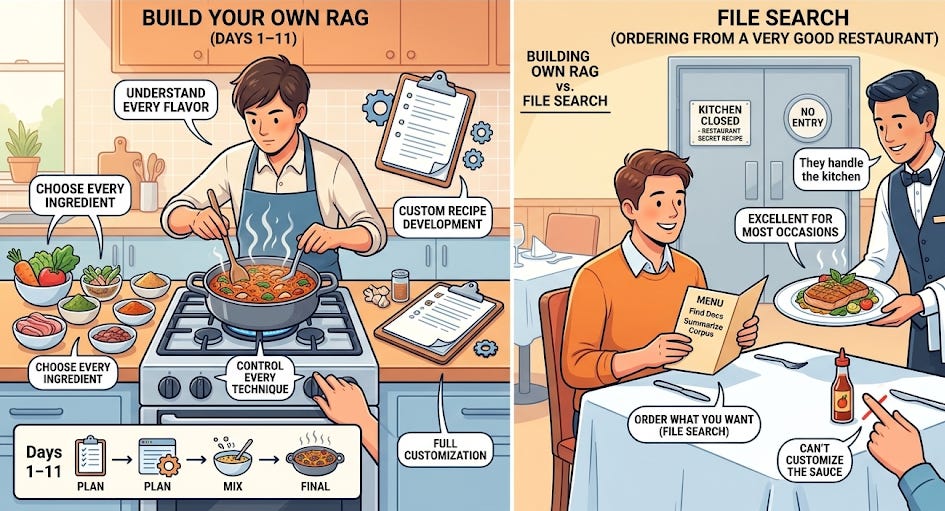
The analogy: Building your own RAG (Days 1–11) is like cooking a meal from scratch - you choose every ingredient, control every technique, and understand every flavor. File Search is like ordering from a very good restaurant. You tell them what you want, they handle the kitchen. The food is excellent for most occasions. But you can’t customize the sauce, and you don’t get to see the recipe.
Important note: The original Assistants API (which you may see in older tutorials) is deprecated and shutting down on August 26, 2026. File Search is now available through the Responses API - the current, supported approach. Everything in this article uses the Responses API.
The Complete Setup - 4 Steps, 10 Minutes
Step 1: Upload your files
python
from openai import OpenAI

client = OpenAI()

# Upload a clinical guideline PDF
file = client.files.create(
    file=open("aha_heart_failure_guideline_2024.pdf", "rb"),
    purpose="assistants",
)
print(f"File uploaded: {file.id}")
Each file can be up to 512 MB and 5 million tokens. Supported formats include PDF, DOCX, MD, TXT, and more - covering nearly every clinical document format we discussed on Day 10.
Step 2: Create a vector store and attach files
python
# Create a vector store
vector_store = client.vector_stores.create(
    name="Clinical Guidelines Collection",
)

# Attach the file to the vector store
client.vector_stores.files.create(
    vector_store_id=vector_store.id,
    file_id=file.id,
)

print(f"Vector store ready: {vector_store.id}")
The vector store is where OpenAI chunks, embeds, and indexes your documents automatically. You can attach multiple files - upload all 20 CME guideline PDFs and attach them to the same store.
For batch uploads (your 20 CME PDFs), use the file batch endpoint to upload multiple files in one call rather than looping one at a time.
Step 3: Ask a question with File Search
python
response = client.responses.create(
    model="gpt-5.4",
    input="What are the four pillars of GDMT for HFrEF?",
    tools=[{
        "type": "file_search",
        "vector_store_ids": [vector_store.id],
    }],
)

print(response.output_text)
That’s it. One API call. The model automatically searches your vector store, retrieves relevant chunks, and generates a grounded answer. No retriever configuration, no prompt formatting, no context injection.
Step 4: Get the citations
By default, the response includes annotations - references to the specific files and passages that were used. To see the full search results:
python
response = client.responses.create(
    model="gpt-5.4",
    input="What is the recommended dose of spironolactone in HFrEF?",
    tools=[{
        "type": "file_search",
        "vector_store_ids": [vector_store.id],
        "max_num_results": 5,  # Control how many chunks to retrieve
    }],
    include=["output[*].file_search_call.search_results"],
)

# The answer
print(response.output_text)

# The source files used
for annotation in response.output[1].content[0].annotations:
    print(f"  Source: {annotation.filename}")
max_num_results is your top-K parameter (Day 6) - it controls how many chunks are retrieved. The default works well for most queries. Lower it (2–3) for focused questions, raise it (8–10) for broad synthesis questions.
When File Search Is the Right Choice
File Search is ideal when:
Speed matters more than control. The CME conference is tomorrow. A clinical informatics pilot needs a working demo this week. Your team wants to evaluate whether RAG is worth investing in before committing to a full build.
The documents are standard clinical text. PDFs of guidelines, journal articles, formulary documents, policy manuals. These are well-structured, text-heavy documents that File Search handles well out of the box.
You don’t need custom chunking. For most clinical guidelines, OpenAI’s automatic chunking is adequate. You don’t need the section-aware splitting we discussed on Day 5.
Prototyping before production. File Search is the fastest way to prove that RAG works for your use case. Once proven, you can rebuild with full control (Days 7–11) for production.
You’re not sending PHI. More on this below.
When to Build Your Own Pipeline Instead
File Search is a managed service - which means tradeoffs. Here’s when you need the full pipeline from Days 7–11:
1. Data privacy and HIPAA
This is the biggest consideration for healthcare. When you upload files to OpenAI’s vector store, that data lives on OpenAI’s infrastructure. For many healthcare organizations, uploading documents containing PHI (Protected Health Information) to a third-party cloud service requires a Business Associate Agreement (BAA) with OpenAI, plus institutional compliance review.
Clinical context: A BAA (Business Associate Agreement) is a legal contract required under HIPAA whenever a covered entity (hospital, health system, insurer) shares PHI with a third party. The BAA specifies how the third party will protect the data, what happens during a breach, and the liability framework. Without a BAA, sharing PHI with any external service - including OpenAI - is a HIPAA violation.
The rule: If your documents contain patient data, de-identified data that could be re-identified, or any PHI - check with your compliance team before using File Search. For documents that are purely clinical guidelines (no patient data), this is typically not a concern.
If you need everything on-premises, build your own pipeline with local embeddings and FAISS (Day 7).
2. Custom chunking requirements
File Search uses OpenAI’s default chunking strategy. You can’t configure chunk size, overlap, or section-aware splitting. For clinical documents with complex structure - operative reports with specific sections, discharge summaries with medication reconciliation lists, radiology reports with structured findings - your own RecursiveCharacterTextSplitter with tailored parameters (Day 5) will produce better retrieval.
3. Full retrieval transparency
With your own FAISS pipeline, you see every retrieved chunk, every similarity score, and can log every retrieval decision for audit. File Search gives you annotations (which files were used) but less granular visibility into the retrieval process. For regulated clinical decision support systems that require full audit trails, build your own.
4. Cost at scale
File Search charges per API call ($2.50 per 1,000 file search calls) plus storage ($0.10/GB/day). For a prototype with occasional queries, this is negligible. For a production system handling thousands of queries per day across a large document collection, the cost adds up. Your own FAISS index has zero per-query cost after the initial embedding.
5. Metadata filtering and advanced retrieval
File Search supports basic metadata filtering (you can tag files with attributes like department or date). But for complex filtering - “search only cardiology guidelines published after 2023 for patients with eGFR > 30” - you need the metadata filtering we will build on Day 19.
The Decision Framework
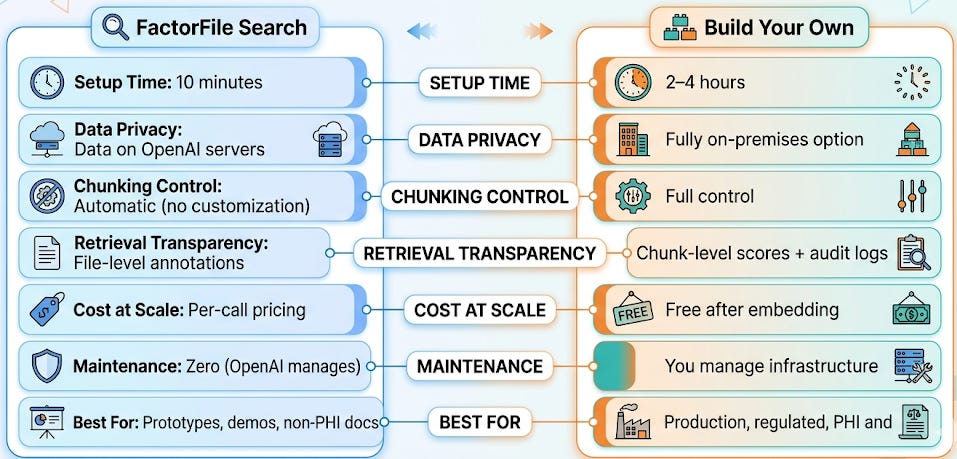
The practical recommendation: Use File Search to validate your idea in a day. If the idea works, rebuild with your own pipeline for production. The concepts are identical - only the infrastructure layer changes.
A Realistic Healthcare Workflow
Here’s how this looks in practice at a hospital:
Week 1: The clinical informatics team uses File Search to build a quick prototype - upload 20 guideline PDFs, demo to the CME committee. The committee is impressed and wants to expand it to the full formulary and antibiotic stewardship guidelines.
Week 2: The compliance team reviews the prototype. The guidelines themselves don’t contain PHI, so File Search is acceptable for this specific use case. But the team wants audit logging and custom chunking for the formulary (which has complex table structures).
Week 3: The team rebuilds the formulary-specific RAG with the full pipeline (Days 7–11) - custom section-based chunking, FAISS with metadata filtering, retrieval logging. They keep File Search running for the simpler guideline Q&A tool.
Result: Two RAG systems serving different needs. File Search for the quick, low-stakes use case. Custom pipeline for the production, auditable use case. Both built on the same fundamental concepts you’ve learned in this series.
Your Takeaway for Today
OpenAI File Search gives you a complete RAG system - chunking, embedding, retrieval, and generation - with zero infrastructure, in 10 minutes. Use it for prototyping, demos, and non-PHI clinical documents. Build your own pipeline when you need data privacy, custom chunking, full audit trails, or cost control at scale. Knowing both approaches - and when to use each - is what makes you a complete RAG practitioner.
Coming Tomorrow: Day 13
Why Bad Retrieval = Bad Answers - The Garbage-In Problem of RAG
You now have two ways to build RAG: custom (Days 7–11) and managed (today). But both can fail spectacularly if the retrieval step returns the wrong chunks. Tomorrow we diagnose the most common retrieval failures in healthcare RAG - and why the best system prompt in the world can’t fix bad retrieval.
→ Subscribe to RAG for Healthcare so you don’t miss Day 13.
Teodora Szasz, PhD - Senior Clinical Data Scientist | FDA 510(k) AI | Co-author, EchoJEPA