
Day 6: Ship It — Deploying Your Model Locally
7 Days to LLM Mastery — Your $200K AI Bootcamp, FREE

Welcome back to the Standout Systems newsletter. You've built it. Now let's ship it.
The Moment of Truth
You’ve:
Understood how LLMs think (Day 1)
Loaded giant models on your laptop (Day 2)
Applied the $1M trick — LoRA (Day 3)
Mastered data alchemy (Day 4)
Fine-tuned with SFTTrainer (Day 5)
Now comes the part most tutorials skip: actually using your model in the real world.
Today, you’ll learn how to deploy your fine-tuned model so anyone can use it — no Python required, no GPU needed.
What You’re Getting Today
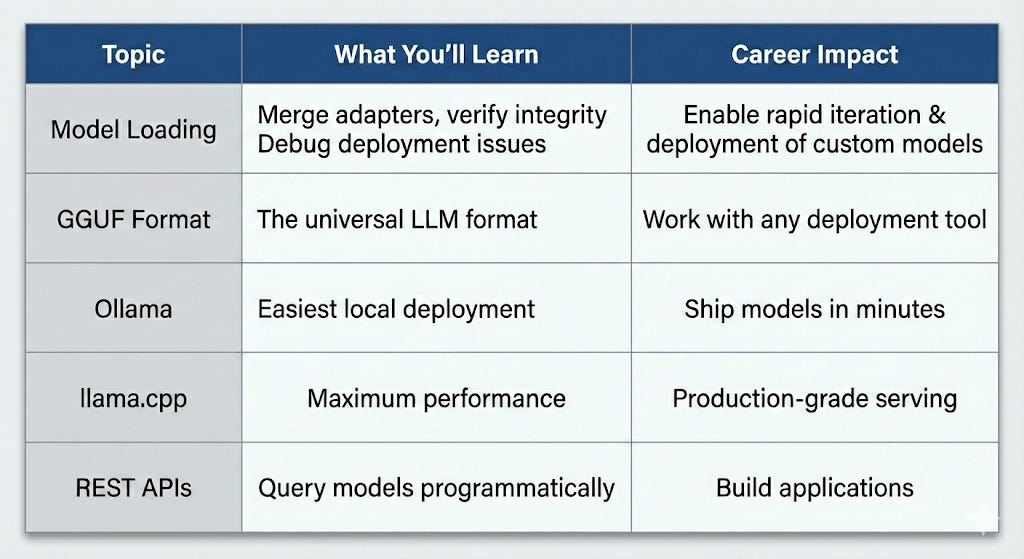
The Deployment Challenge
The Problem:
Your fine-tuned model lives in PyTorch/Hugging Face format
End users don’t have Python, PyTorch, or GPUs
You need something fast, portable, and easy to use
The Solution:
Convert to GGUF format (universal, efficient)
Serve with Ollama or llama.cpp
Query via web interface or REST API
Step 1: Preparing Your Model
Loading Adapters Properly
After training, you have:
Base model (quantized, large)
Adapter weights (tiny, ~10-50 MB)
