Stop Fine-Tuning Models You Should Just Be Prompting (And Vice Versa)
The $50,000 mistake teams make every week — and the simple decision tree that prevents it.

A startup I advised burned $47,000 fine-tuning GPT-3.5 on their customer support data.
Six weeks of work. Three ML engineers. Thousands of labeled examples.
The result? A model that performed 2% better than a well-crafted prompt.
Meanwhile, another company I worked with spent months prompt-engineering a legal document analyzer — tweaking instructions, adding examples, trying every trick in the book.
They finally gave up and fine-tuned. Performance jumped 40% overnight.
Same technology. Opposite outcomes. The difference? Knowing when to teach the model vs. when to just ask better questions.
Today, I’m giving you the decision framework that separates the teams that ship from the teams that spin.
The Fundamental Tradeoff (Tattoo This On Your Brain)
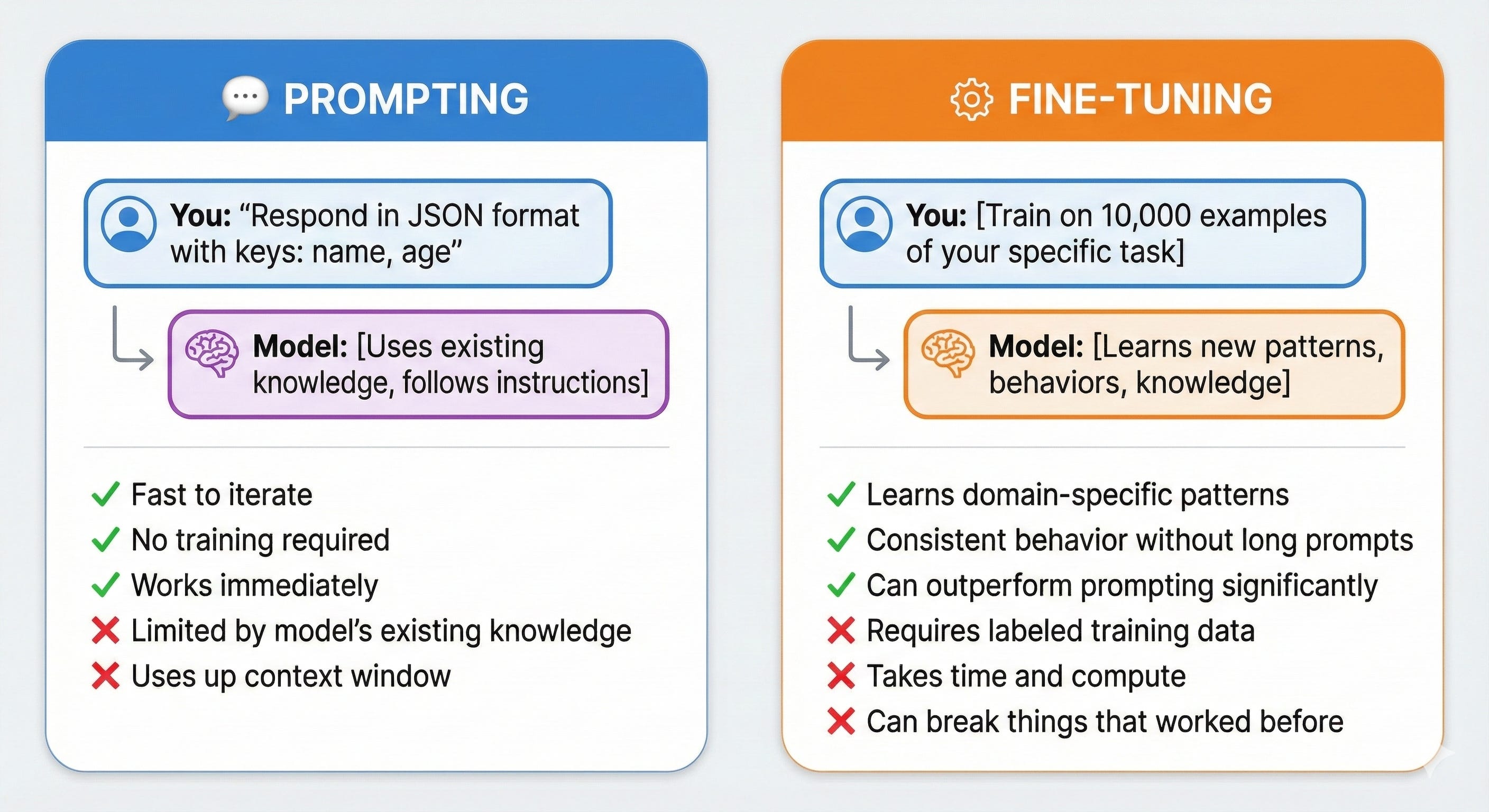
Prompting = Changing what you ask the model Fine-tuning = Changing what the model knows
That’s it. Everything else flows from this.
The Decision Tree (Your New Best Friend)
Before you do anything, run through this:
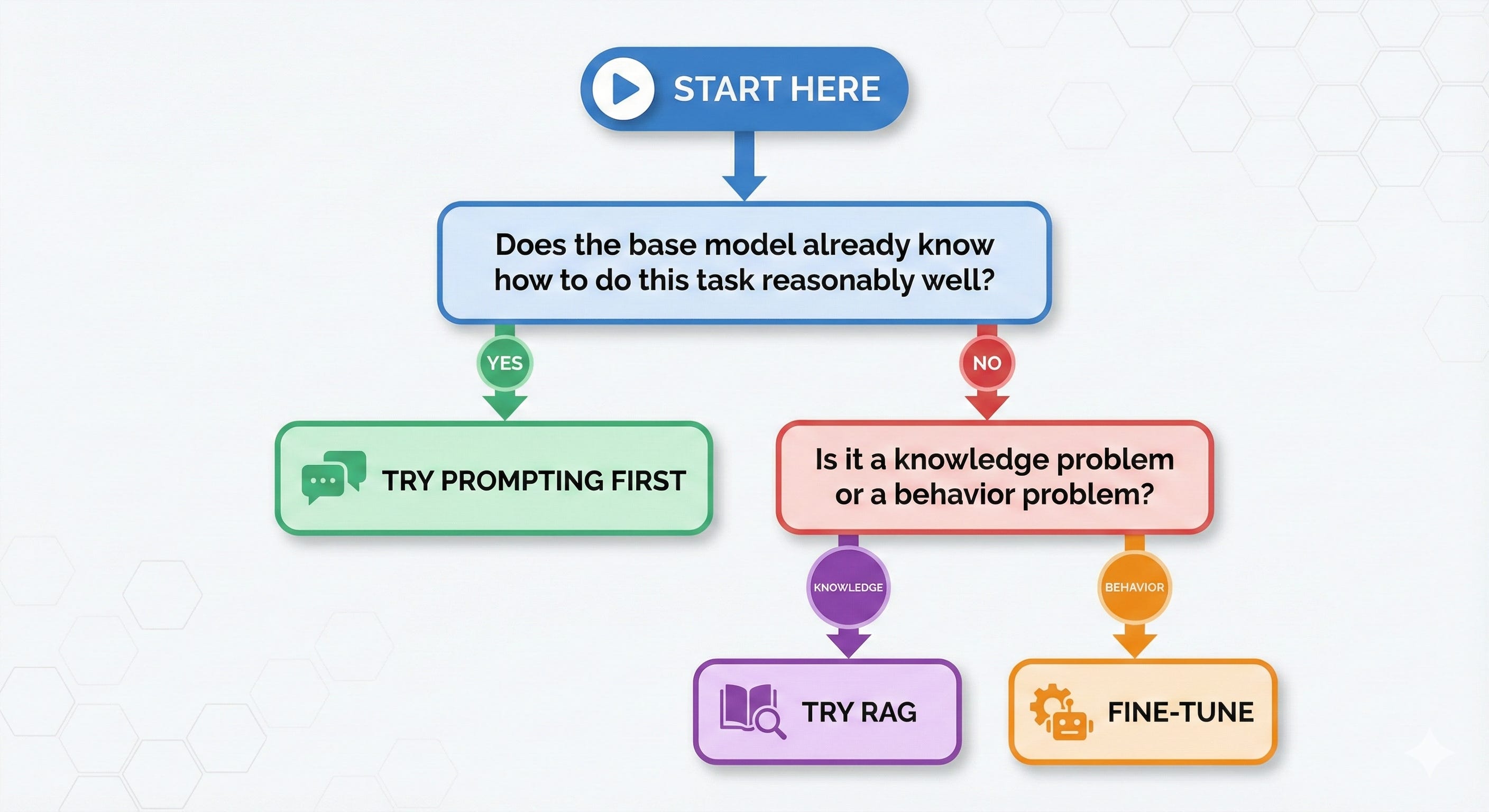
Let me break down each path:
Path 1: When Prompting Is All You Need
Use prompting when the model already knows HOW to do the task — you just need to tell it WHAT you want.
Signs You Should Just Prompt Better:
✅ The task is general (summarization, translation, Q&A) ✅ You want a specific output format (JSON, markdown, tables) ✅ You need a certain tone or style ✅ You’re extracting information the model already understands ✅ You have <100 examples of what you want
The Prompting Toolkit
1. Zero-Shot: Just ask
Classify this customer review as positive, negative, or neutral:
"The product arrived late but works great."
2. Few-Shot: Show examples
Classify these reviews:
Review: "Absolutely love it!" → Positive
Review: "Terrible quality." → Negative
Review: "The product arrived late but works great." → ???
3. Chain-of-Thought: Make it think step by step
Analyze this customer review step by step:
1. Identify the main sentiment words
2. Weigh positive vs negative aspects
3. Consider the overall impression
4. Provide final classification

Review: "The product arrived late but works great."
4. System Prompts: Set the persona
You are a senior customer support analyst at a Fortune 500 company.
You classify customer feedback with high accuracy and explain your reasoning.
Real Example: Format Transformation
❌ Don’t fine-tune for this: “Convert this text to JSON”
✅ Just prompt:
Convert the following customer info to JSON with keys:
name, email, phone, company.

Text: "John Smith from Acme Corp, reach him at john@acme.com or 555-1234"
GPT-4 already knows JSON. It knows how to parse text. You’re not teaching it anything new — you’re just directing its existing capabilities.
Path 2: When You Need RAG (The Middle Ground)
Use RAG when the model needs ACCESS to knowledge it wasn’t trained on.
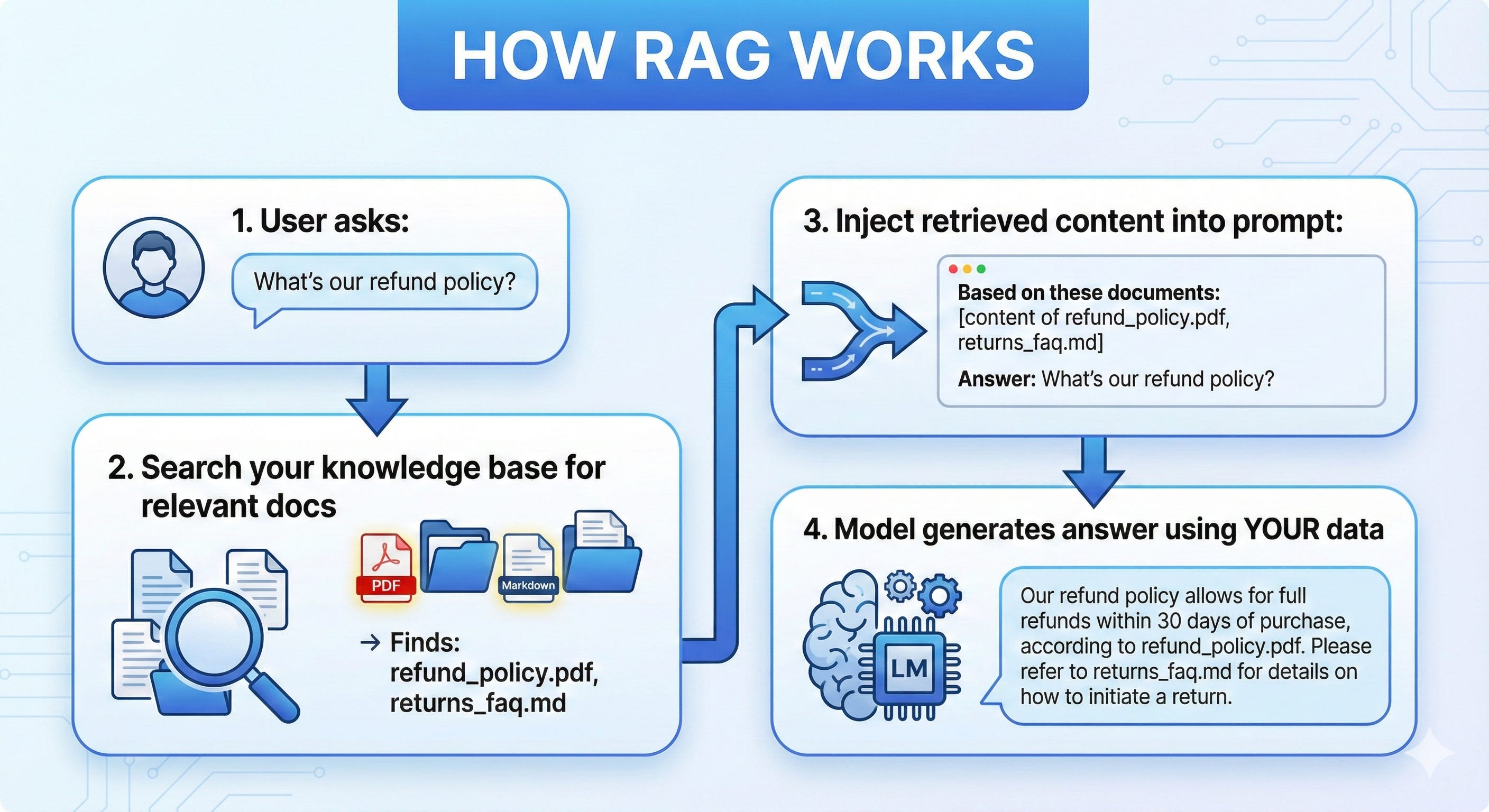
RAG = Retrieval-Augmented Generation
Instead of teaching the model your company’s knowledge, you give it access to that knowledge at query time.
Signs You Should Use RAG:
✅ The model needs company-specific information ✅ Your knowledge base changes frequently ✅ You need citations/sources for answers ✅ You want to avoid hallucinations about facts ✅ You have documents, not training examples
RAG vs Fine-Tuning for Knowledge
ScenarioRAGFine-TuningKnowledge changes weekly✅ Perfect❌ Retrain every week?Need source citations✅ Built-in❌ Model doesn’t cite10,000 product SKUs✅ Store in vector DB❌ Can’t memorize allCompany policies✅ Retrieve latest❌ Might be outdated
Real Example: Customer Support Bot
The Problem: Bot needs to answer questions about your specific products, policies, and procedures.
❌ Fine-Tuning Approach:
Collect 10,000 Q&A pairs
Train for several hours
Redeploy when policies change
Model might hallucinate outdated info
✅ RAG Approach:
Index your knowledge base documents
On each query, retrieve relevant sections
Model answers based on retrieved context
Update docs anytime, no retraining
python
# Simplified RAG flow
def answer_question(user_query):
    # 1. Find relevant documents
    relevant_docs = vector_db.search(user_query, top_k=3)

    # 2. Build prompt with context
    prompt = f"""
    Based on these documents:
    {relevant_docs}

    Answer this question: {user_query}
    If the answer isn't in the documents, say "I don't know."
    """

    # 3. Generate answer
    return llm.generate(prompt)
Path 3: When Fine-Tuning Is The Answer
Use fine-tuning when you need to change the model’s BEHAVIOR, not just its knowledge.
Signs You Should Fine-Tune:
✅ You need a specific style/voice consistently ✅ The task requires specialized reasoning patterns ✅ Prompting hits a performance ceiling ✅ You have 1,000+ high-quality examples ✅ The behavior needs to be learned, not described
What Fine-Tuning Actually Changes
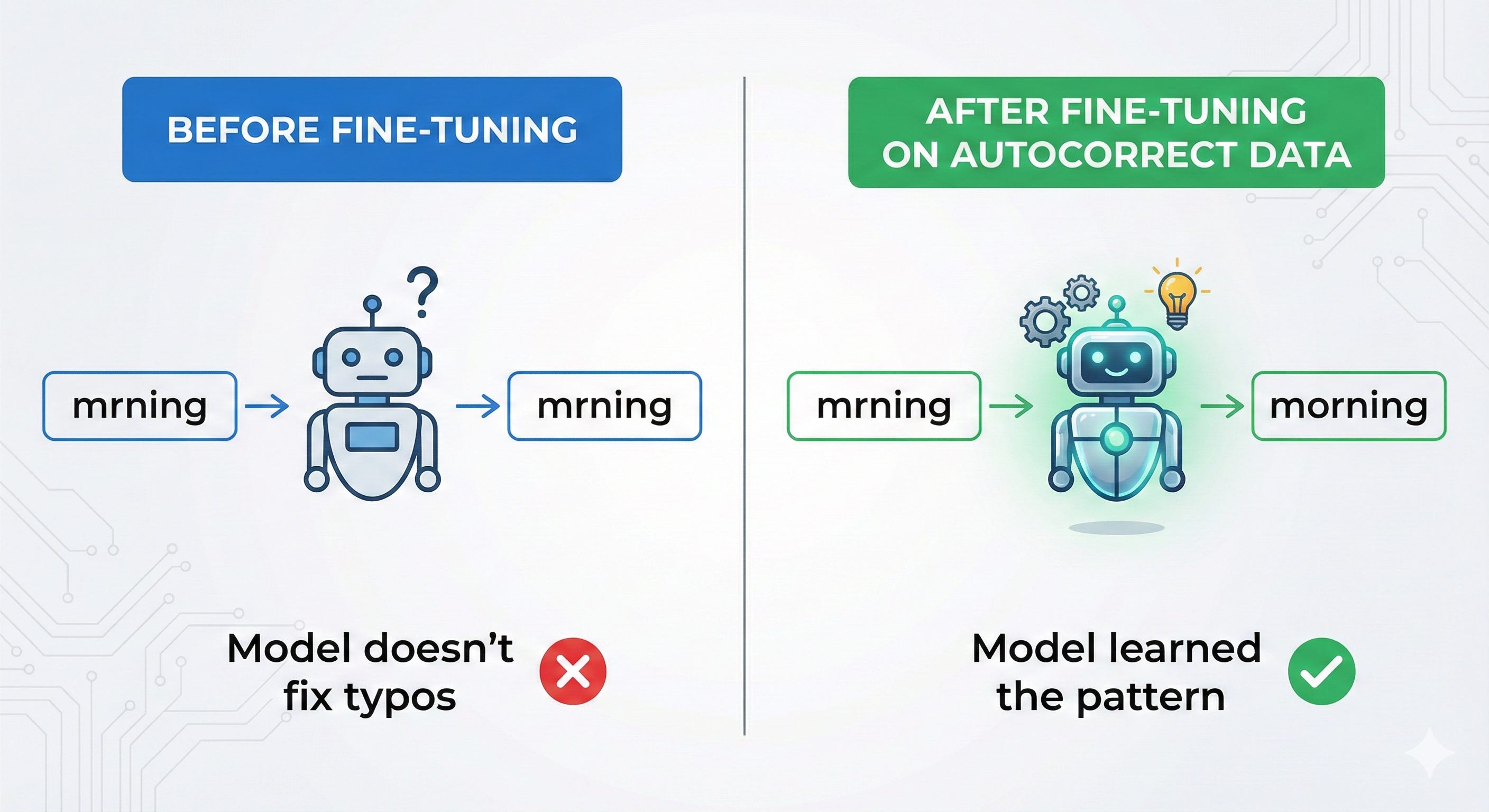
Fine-tuning updates the model’s weights. It’s literally teaching the model new patterns:
Real Examples Where Fine-Tuning Wins
1. Domain-Specific Language
Medical notes, legal documents, and code in proprietary languages have patterns GPT never saw. No amount of prompting teaches these — you need training data.
❌ Prompting: "Parse this radiology report"
   → Model struggles with medical abbreviations

✅ Fine-tuning on 5,000 radiology reports:
   → Model learns "WNL" = "within normal limits"
   → Model learns report structure
   → 40% accuracy improvement
2. Consistent Output Format
If you need the model to ALWAYS output in a specific schema, fine-tuning beats prompting:
❌ Prompting:
   → Works 90% of the time
   → Occasionally breaks format
   → Edge cases fail unpredictably

✅ Fine-tuning:
   → 99%+ format compliance
   → Learned the schema deeply
   → Handles edge cases
3. Complex Multi-Step Tasks
When the reasoning pattern is too complex to explain in a prompt:
❌ Prompting for legal contract analysis:
   → Long, complex system prompt
   → Inconsistent results
   → Can't capture all edge cases

✅ Fine-tuning on 2,000 annotated contracts:
   → Model learns the extraction pattern
   → Consistent, reliable output
   → Handles variations automatically
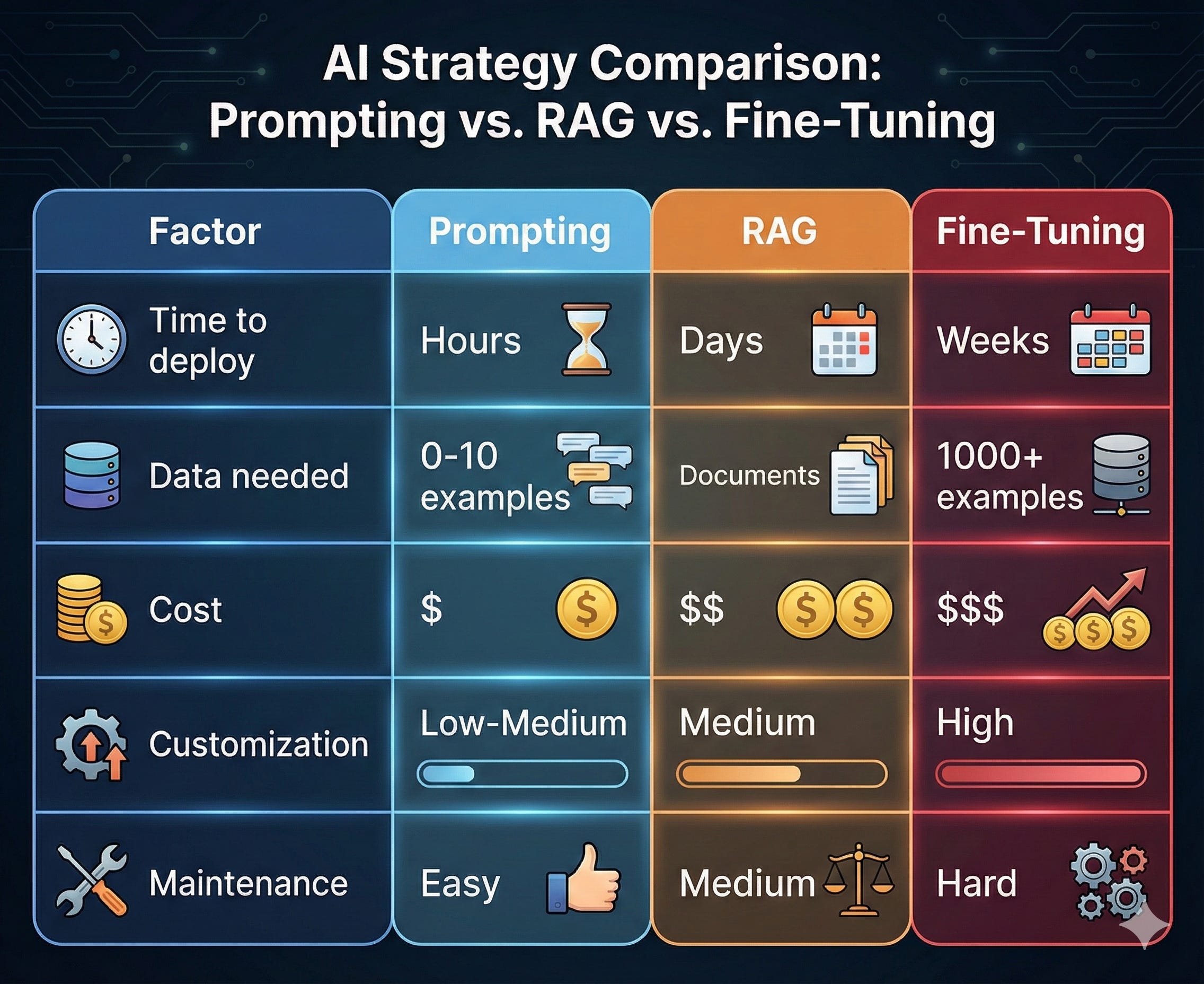
The Cost-Benefit Reality Check
Before you decide, do the math:
Prompting Costs
Time: Hours to days
Money: API costs only (~$0.01-0.10 per query)
Risk: Low (easy to iterate)
Maintenance: Update prompt anytime
RAG Costs
Time: Days to weeks (setup infrastructure)
Money: Vector DB + embedding costs + API costs
Risk: Medium (retrieval quality matters)
Maintenance: Keep knowledge base updated
Fine-Tuning Costs
Time: Weeks (data collection + training + eval)
Money: $100-$10,000+ (depending on model/data size)
Risk: High (might degrade other capabilities)
Maintenance: Retrain when requirements change
The Decision Matrix